Rate Limiter System Design: 5 Algorithms Explained Simply
Fixed window, sliding log, sliding counter, token bucket and leaky bucket, with live simulators

Every app shows "Resend OTP in 30 seconds".
That small timer is a rate limiter.
And "Design a rate limiter" is one of the most asked system design interview questions.
This post explains the 5 rate limiting algorithms simply, each with a live simulator. Then we take it to many servers with Redis, and cover the follow-up questions interviewers ask.
https://www.youtube.com/watch?v=J5wziH5OAZM
Full video (in Hindi) above. Notes and whiteboards on GitHub.
TL;DR
A rate limiter decides: allow the request, or reply 429 Too Many Requests.
Every rule = who you count + how many + per how long.
Fixed window is simple but leaks at the edges. The next 4 algorithms fix that, one by one.
Default pick: token bucket. Most accurate: sliding window log.
On many servers: shared counters in Redis, made atomic with a Lua script.
Why rate limiting matters
A server is just a machine, and every machine has a limit. For example, say yours is comfortable at about 100 requests per minute. Push it past that, and it slows down. At 200, it may start failing.
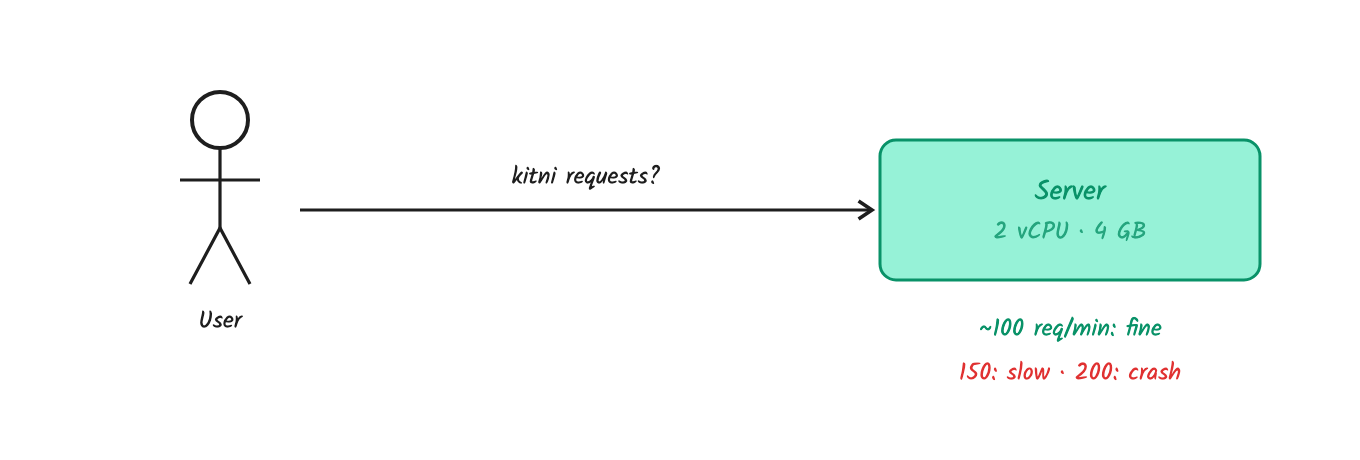
Every server has a limit.
Now one buggy client gets stuck in a retry loop and sends 10,000 requests per minute. The server goes down for every user.
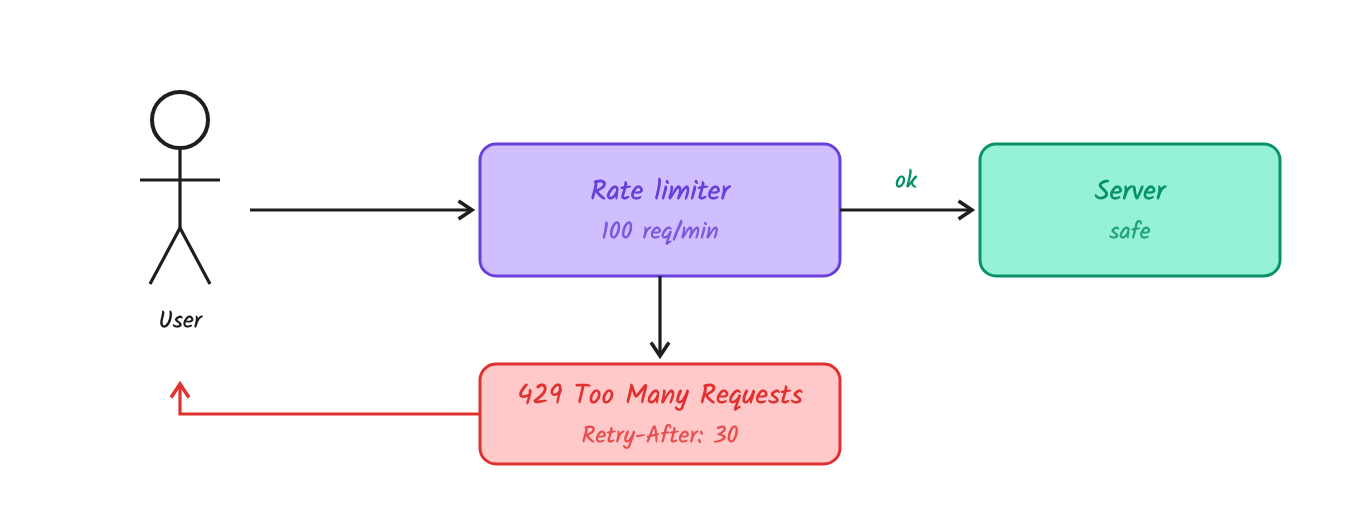
Over the limit? The rate limiter replies 429 with a Retry-After header.
A rule always has 3 parts: who (user ID, IP, API key, phone number), how many (100) and per how long (per minute).
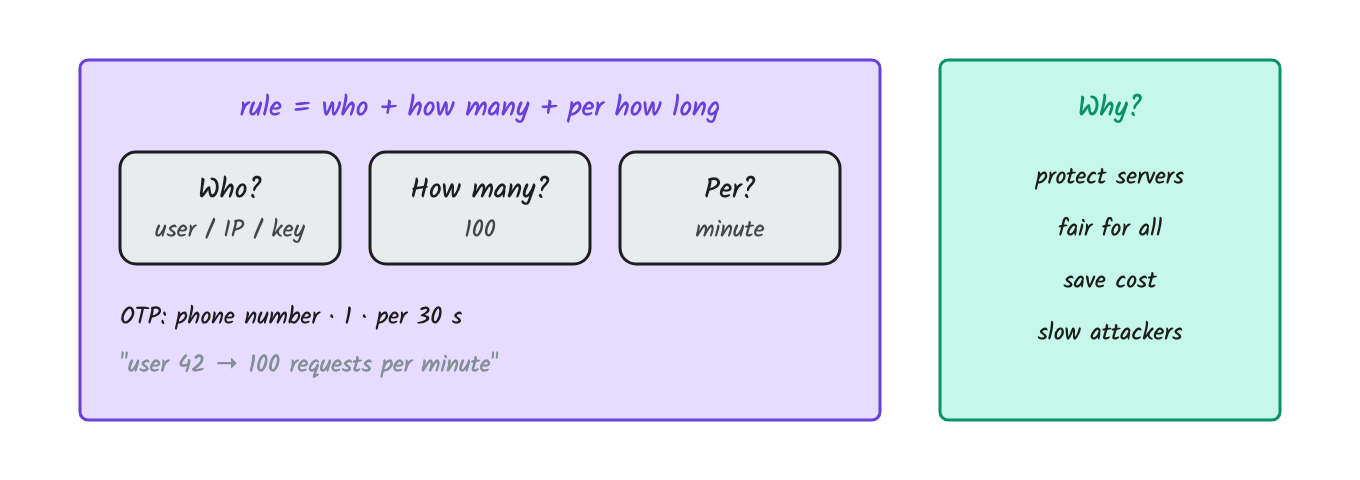
For OTP, there is no user ID before login. So you count by phone number. Add a limit per IP too. Otherwise an attacker uses 1,000 phone numbers, each under its limit, and you pay the SMS bill. This is called SMS pumping.
So we rate limit to protect servers, be fair to all users, control cost (SMS, LLM tokens and payment APIs charge per call) and slow down attackers.
Reject or queue?
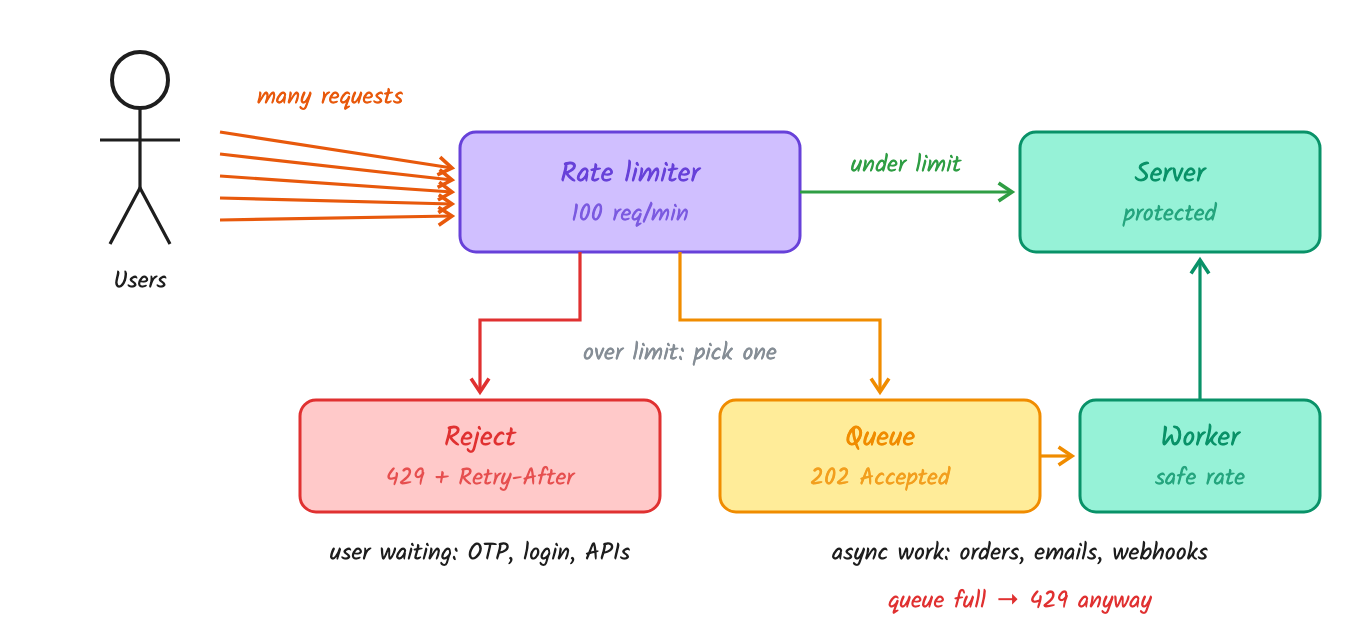
Reject (429) when a user is waiting: login, OTP, public APIs.
Queue (202 Accepted) when the work can happen later: emails, webhooks, flash-sale orders. A worker processes it at a safe speed.
Keep the queue size fixed and return 429 when it's full. Queue only async work, and make jobs idempotent.
Rate limiting rejects a user over quota. Throttling slows a user down. Load shedding drops requests when the server itself is overloaded.
Where does it go?
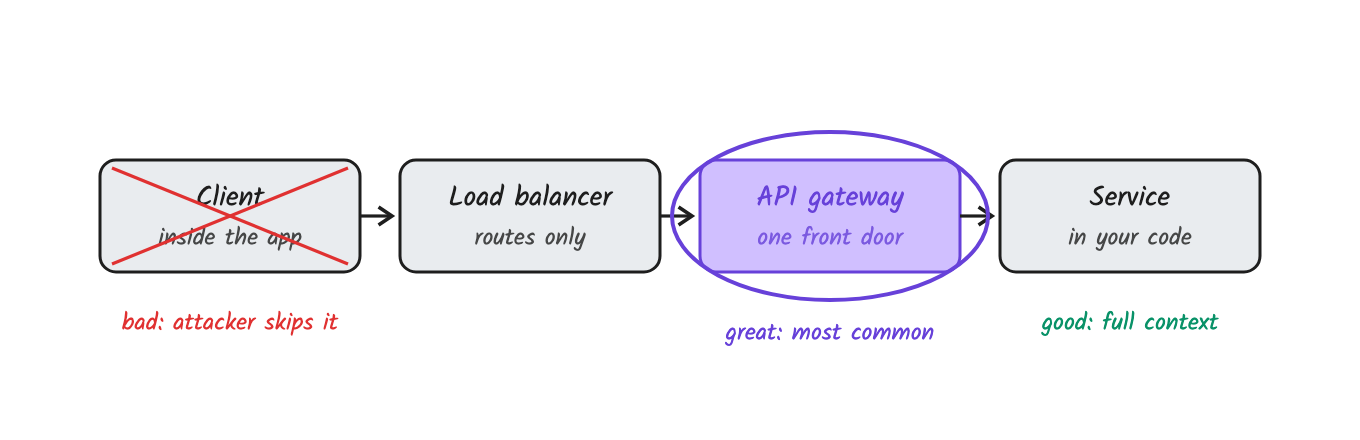
Client app: doesn't work. An attacker skips your app and calls the API directly.
API gateway: the most common place. One entry point before all services (Kong, Nginx, AWS API Gateway).
Inside the service: use it when the rule needs business data, like the user's plan.
A good interview answer: common rules at the gateway, business rules in the service.
1. Fixed window counter
Idea: Split time into windows (say 1 minute). Count requests in each window. Reset the count when a new window starts.
Think of it like: a canteen that serves 100 plates per hour. The count resets every hour.
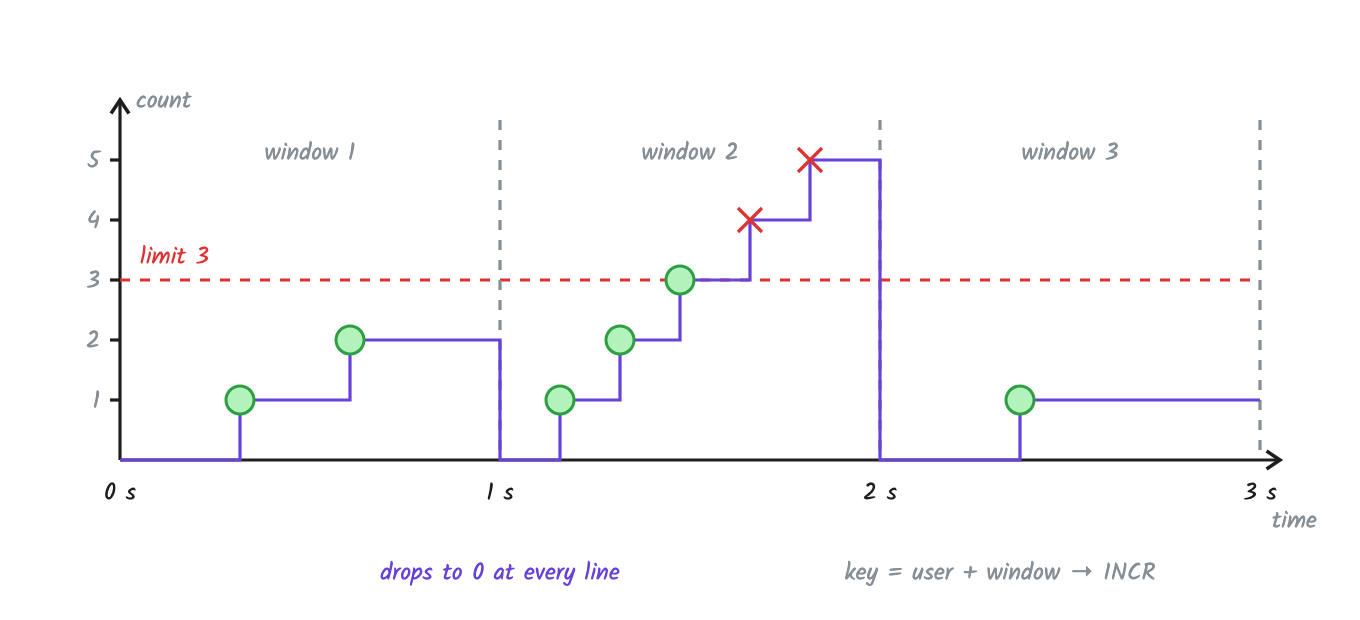
Limit 3 per window. The 4th and 5th requests in window 2 are rejected. The count drops to 0 at every window line.
The edge attack
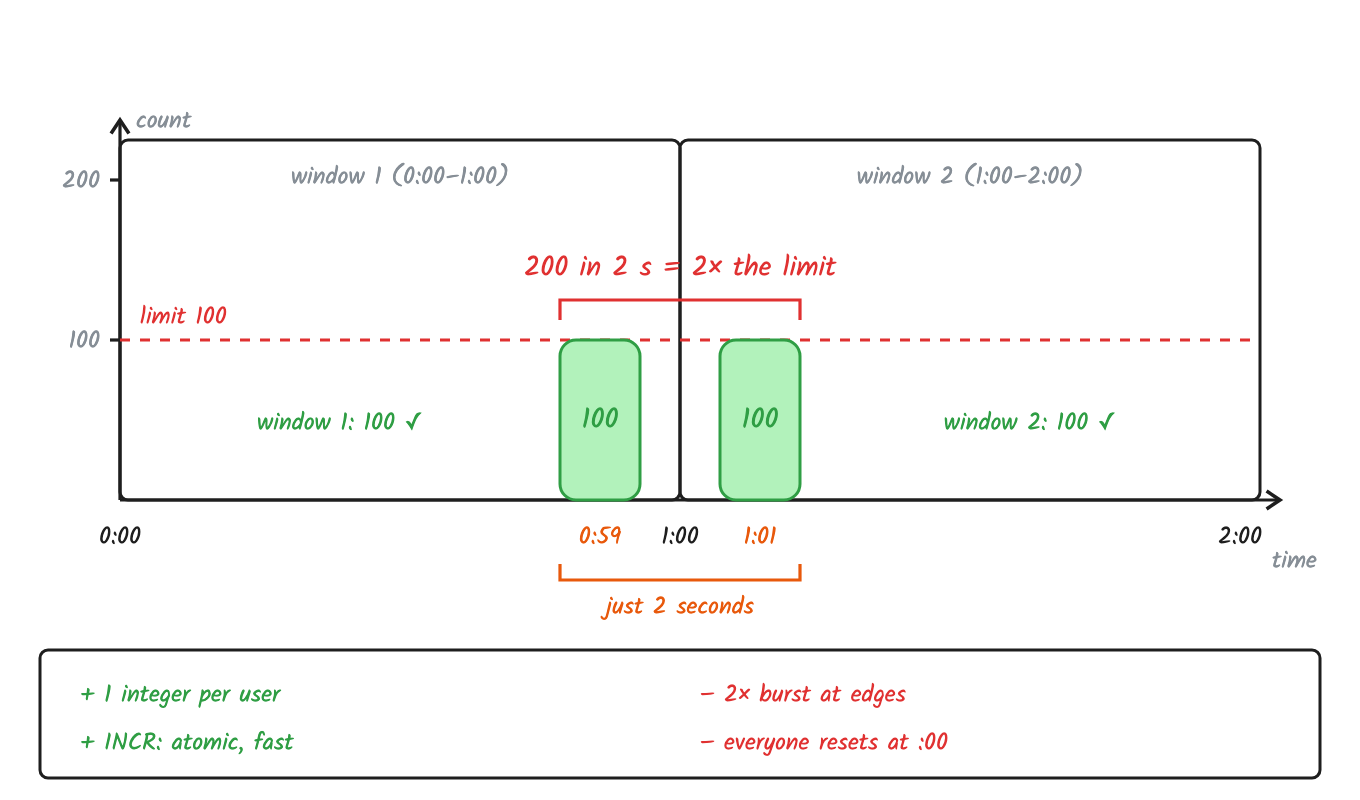
100 requests at 0:59, 100 more at 1:01. Both windows say OK. That's 200 in 2 seconds.
Why it's called an edge attack: the counter resets to 0 exactly at the window edge (1:00). So an attacker sends 100 requests just before the edge and 100 just after it.
Window 1 sees 100 → under the limit ✅
Window 2 sees 100 → under the limit ✅
The server gets 200 requests in 2 seconds, which is 2× the limit.
If both bursts land at 0:59.999 and 1:00.001, that's 200 requests in a few milliseconds. Each window looks fine on its own, but together they break the limit.
✅ Simple and fast. 1 number per user, one Redis
INCR.❌ Allows 2× the limit at window edges.
❌ Everyone's count resets at the same second, so traffic spikes at :00.
Good for: daily or monthly quotas, where the edge problem doesn't matter.
In Redis, it's one counter per user per window, with an expiry so old keys get deleted:
count = INCR user42:10:01                  # count this request, say 100
if count == 1: EXPIRE user42:10:01 60      # first request: delete the key after the window
allow = count <= 100                       # 100 <= 100, so allow
The crash: INCR and EXPIRE are two commands. If the app crashes in between, the key has no expiry. The next minute uses a new key, so the user is fine. But the old key stays in Redis forever, and millions of them fill up memory. (If your key is just user42, with no window number, it's worse: the count never resets, and the user gets 429 forever.)
Fix it by creating the key with its expiry first. Then a crash in between does no harm:
SET user42:10:01 0 EX 60 NX    # create only if missing, with the expiry in the same command
INCR user42:10:01              # INCR keeps the expiry
https://codepen.io/systemdesignwithparam/pen/pveKjvW
2. Sliding window log
Idea: Save the time of every request. When a new request comes, delete entries older than the window. Then count what's left.
Think of it like: a security guard with a register. He only counts entries from the last hour before letting you in.
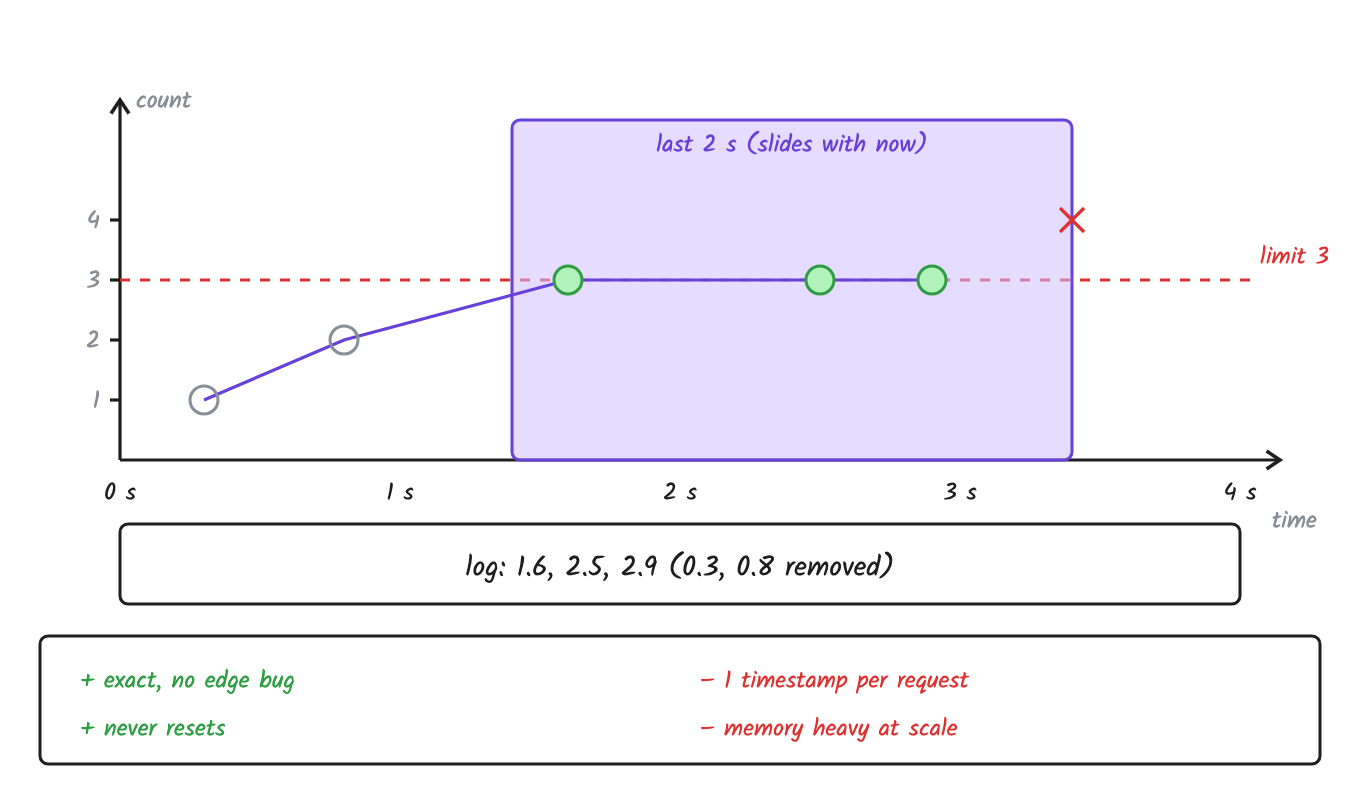
The window moves with time. Old requests drop out, so there is no edge to abuse.
Example: Limit is 3 per 2 seconds. Requests came at 0.3, 0.8, 1.6, 2.5 and 2.9 seconds. A new one comes at 3.4.
The window is now 1.4 to 3.4. So 0.3 and 0.8 drop out. Left: 1.6, 2.5 and 2.9. That's 3, so 3.4 is rejected.
✅ Exact. No edge problem.
❌ Stores one timestamp per request. A 1,000/hour limit means up to 1,000 entries per user.
❌ More work on every request: delete old entries, then count.
Good for: strict, low-volume limits like OTP and login.
In Redis, it's a sorted set per user, with the request time as the score:
ZREMRANGEBYSCORE user42 0 (now - 60)    # remove entries older than the window
ZCARD user42                            # count what's left, say 99
ZADD user42 now req-id                  # 99 < 100, so save this request
The race: two servers run ZCARD at the same time. Both see 99, both add, and now there are 101. Fix it with one Lua script, so the check and the add run as one step:
-- KEYS[1] = user key, ARGV = now (s), window (s), limit, unique request id
redis.call('ZREMRANGEBYSCORE', KEYS[1], 0, ARGV[1] - ARGV[2])
if redis.call('ZCARD', KEYS[1]) < tonumber(ARGV[3]) then
  redis.call('ZADD', KEYS[1], ARGV[1], ARGV[4])
  redis.call('EXPIRE', KEYS[1], ARGV[2])
  return 1
end
return 0
https://codepen.io/systemdesignwithparam/pen/zxZavxL
3. Sliding window counter
Idea: Keep only 2 counters, the previous window and the current one. Estimate the count for the last 60 seconds.
Think of it like: guessing today's crowd from yesterday's count plus today's count so far.
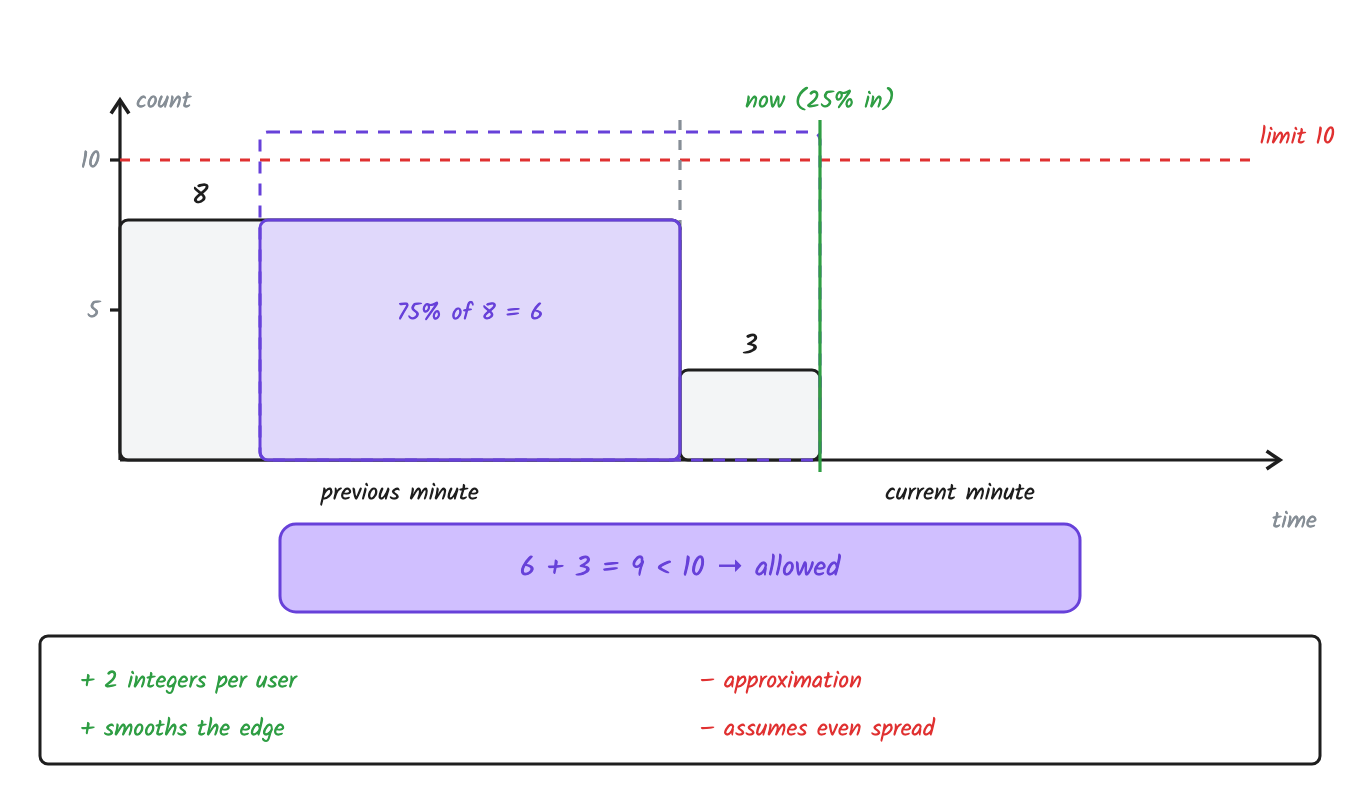
We are 25% into this minute, so 75% of the last minute still counts.
Example: Limit is 10 per minute. Last minute had 8 requests. This minute has 3 so far.
Estimate = 8 × 75% + 3 = 9. That's under 10, so the request is allowed.
✅ Only 2 numbers per user.
✅ Almost exact. Cloudflare saw only 0.003% wrong decisions out of 400 million requests.
❌ It's an estimate. It assumes requests were spread evenly.
❌ Like all window methods, it treats every burst as bad. But a real app fires about 10 calls when it opens.
Used by: Cloudflare.
In Redis, it's 2 counters per user, one per window:
GET  user42:10:00     # previous window, say 8
GET  user42:10:01     # current window, say 3
                      # 8 × 75% + 3 = 9 < 10, so allow
INCR user42:10:01     # count this request
The race: two servers read at the same time. Both see 9, both add, and now the estimate is 11. Fix it the same way as the sliding log: one Lua script that reads, checks and adds as one step.
https://codepen.io/systemdesignwithparam/pen/qErKOEg
4. Token bucket
Idea: A bucket holds tokens. Tokens refill at a fixed speed. Each request takes one token. No token? 429.
Think of it like: metro tokens. New ones come at a fixed speed, and saved ones can be used all at once.
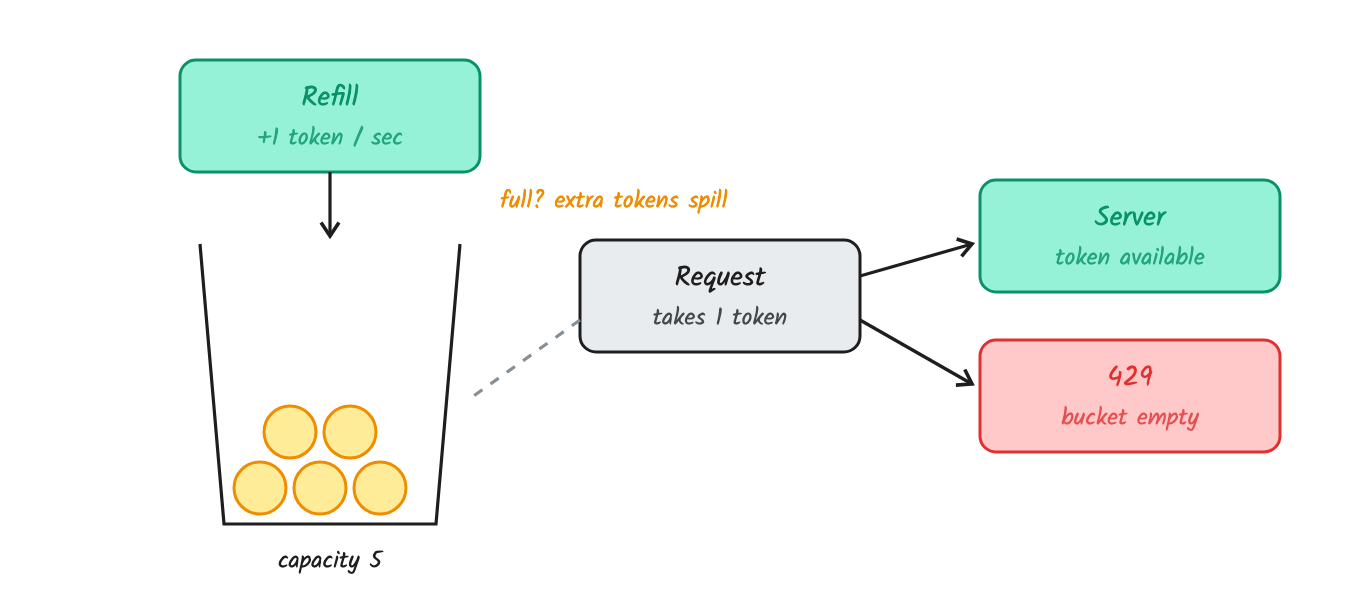
Bucket size = the biggest burst you allow. Refill speed = the average rate.
Example: Bucket size 5, refill 1 token per second. An app opens and fires 5 calls at once. All 5 pass. The 6th call gets 429 with Retry-After: 1, because the next token comes in 1 second.
No timer needed. Don't run a job that adds tokens every second for millions of users. Store 2 numbers, tokens and last_time, and calculate when a request comes:
tokens = min(capacity, tokens + seconds_passed * refill_rate)
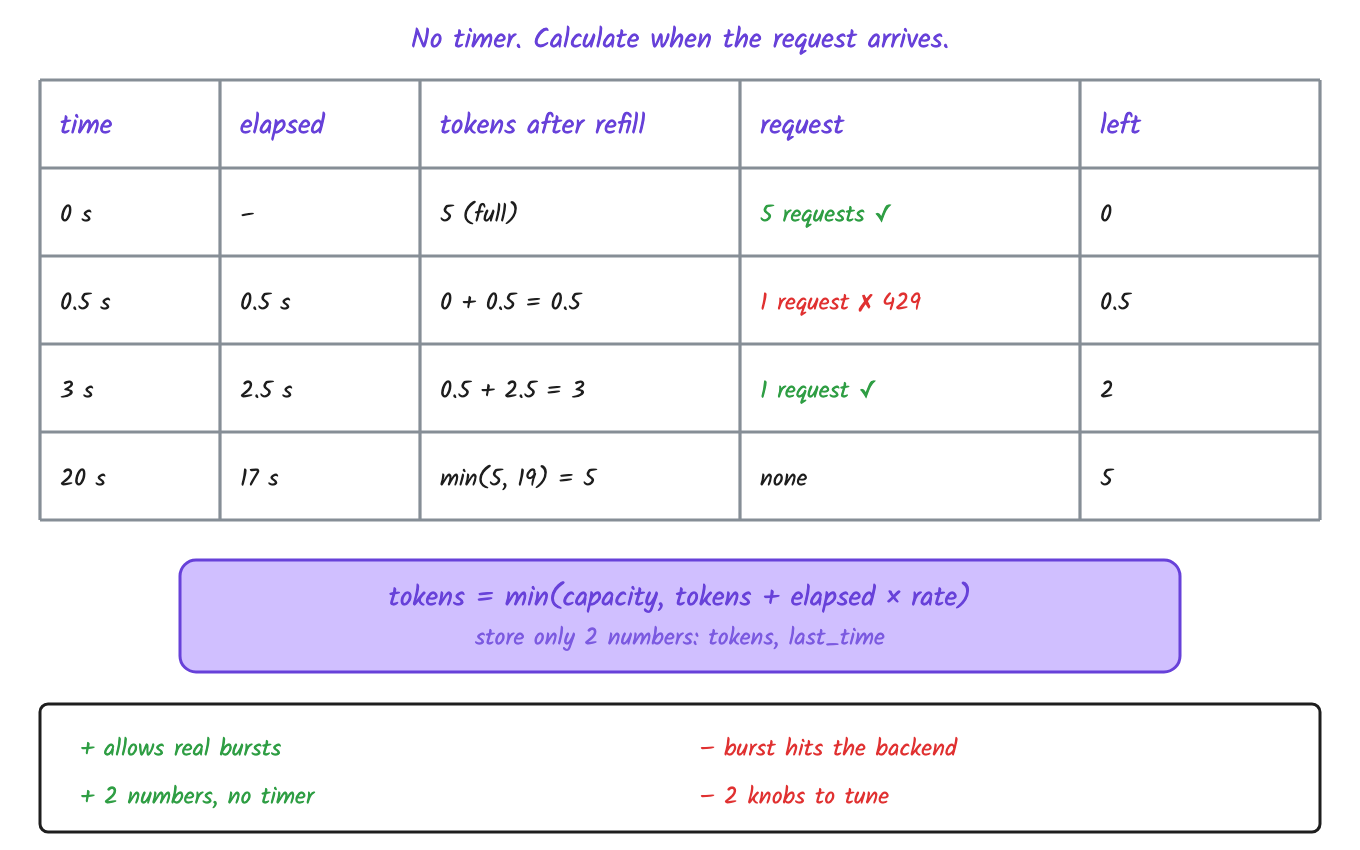
At 20 s the math says 19 tokens, but the bucket holds only 5.
✅ Allows real bursts, like the calls when an app opens.
✅ Only 2 numbers per user.
❌ A full bucket sends the whole burst to your backend at once.
❌ 2 values to tune: size and refill speed.
Used by: Stripe and AWS API Gateway.
In Redis, it's a hash per user with the 2 numbers:
HMGET user42 tokens ts          # read: 1 token left, last seen 2 s ago
                                # refill: min(5, 1 + 2 × 1) = 3, take 1, so allow
HSET  user42 tokens 2 ts now    # write back
The race: a user has 1 token left. Two requests hit two servers at the same moment. Both read tokens = 1 before either writes 0. 1 token, 2 requests. You'll never see this on your laptop.
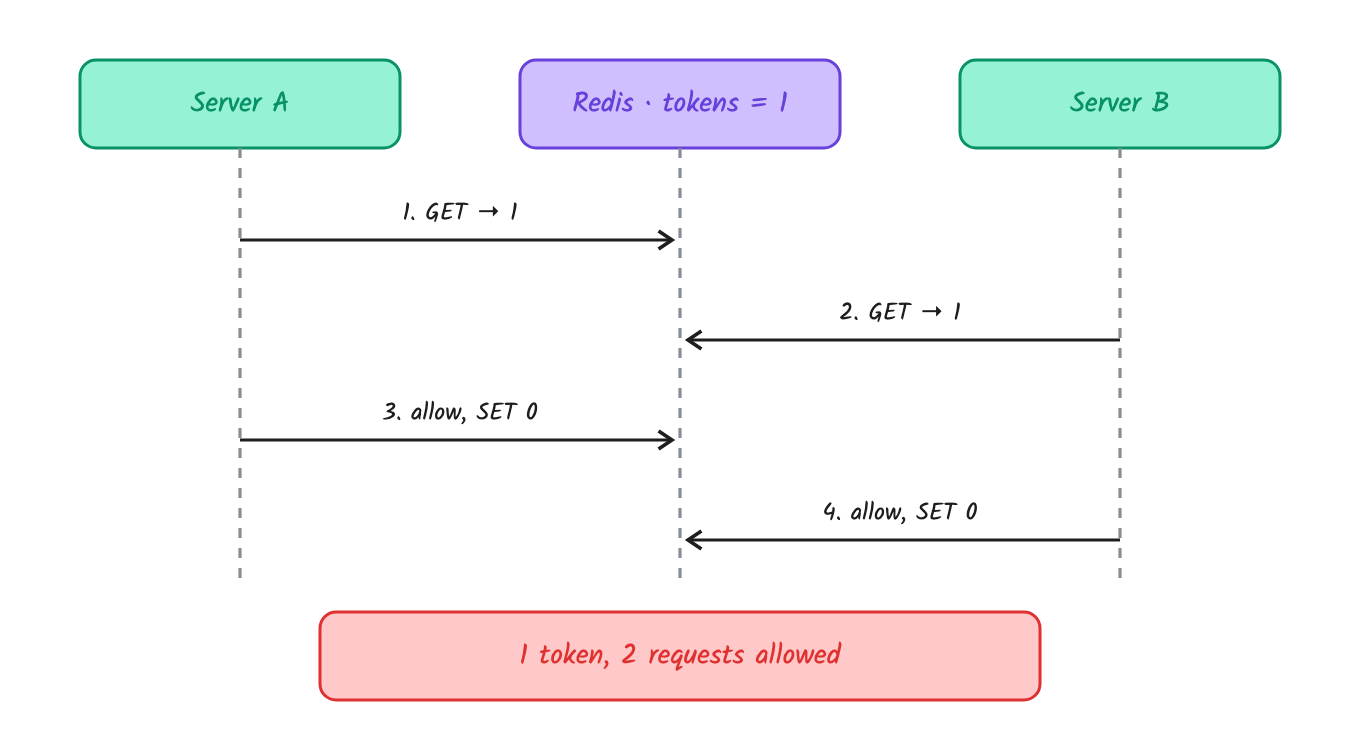
Both servers read 1 token before either writes. Both allow.
Fix it with one Lua script. Redis runs a script as one step, so nothing can run in between:
-- Token bucket, atomic. KEYS[1] = bucket key, ARGV[1] = capacity, ARGV[2] = refill rate (tokens/sec)
local t = redis.call('TIME')                              -- one clock for all servers
local now = tonumber(t[1]) + tonumber(t[2]) / 1e6
local b = redis.call('HMGET', KEYS[1], 'tokens', 'ts')
local cap, rate = tonumber(ARGV[1]), tonumber(ARGV[2])
local tokens = tonumber(b[1]) or cap
local ts = tonumber(b[2]) or now
tokens = math.min(cap, tokens + (now - ts) * rate)        -- lazy refill
local allowed = tokens >= 1
if allowed then tokens = tokens - 1 end
redis.call('HSET', KEYS[1], 'tokens', tokens, 'ts', now)
redis.call('EXPIRE', KEYS[1], math.ceil(cap / rate) * 2)  -- clean up idle users
return allowed and 1 or 0
https://codepen.io/systemdesignwithparam/pen/VYpdvYJ
5. Leaky bucket
Idea: Requests go into a queue. A worker takes them out at a fixed speed. If the queue is full, new requests are dropped.
Think of it like: the water tank on your roof. However full it is, water comes out of the tap at the same speed.
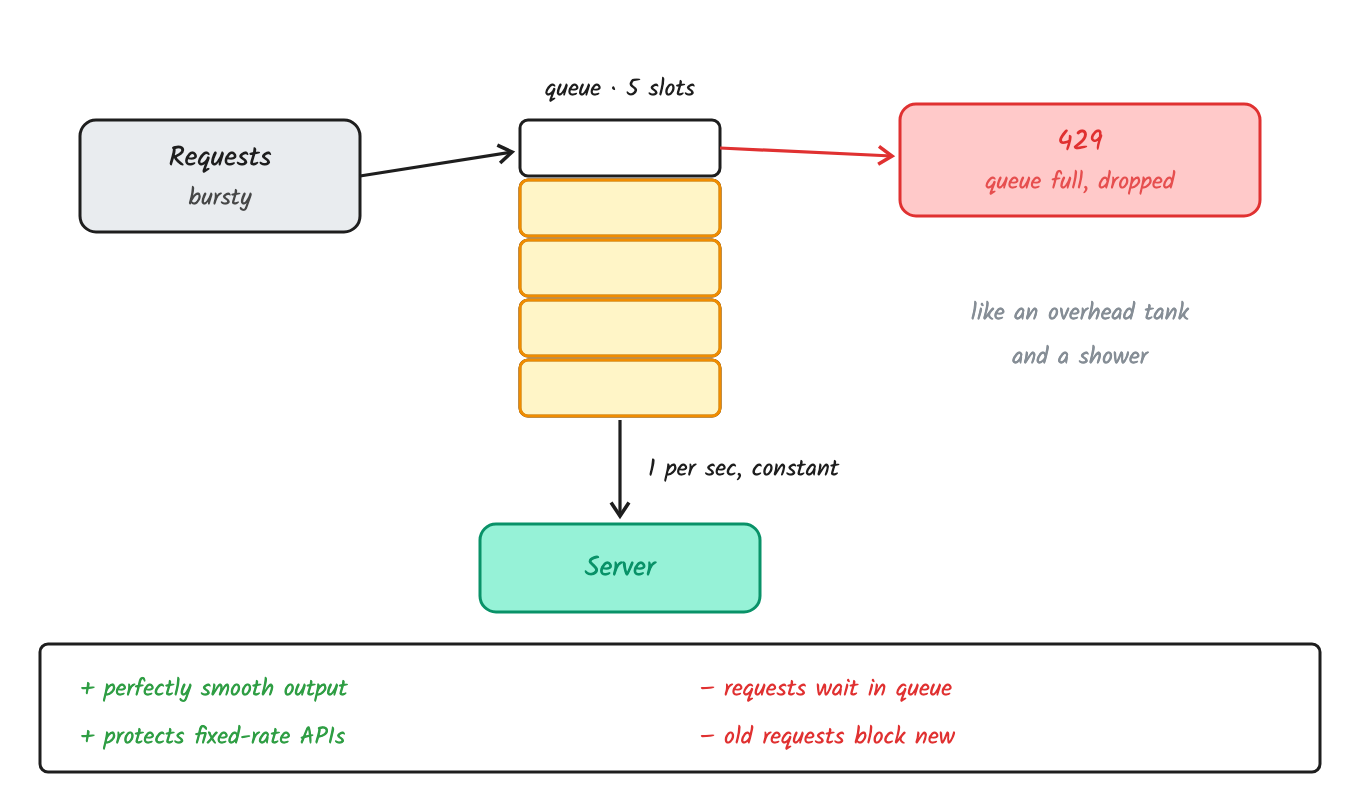
Bursty in, smooth out.
Example: A bank API accepts only 2 requests per second. You put requests in a queue of 5 and send them out at 2 per second. The bank never sees more than 2. If 10 requests arrive at once, 5 wait in the queue and the rest get 429.
✅ Perfectly smooth output for systems that can't take bursts.
❌ Requests have to wait in the queue.
❌ Old requests can block new ones.
Used by: Shopify's API and Nginx limit_req.
In Redis, it's a list per user as the queue, plus a worker:
LLEN  queue:user42            # 4 waiting, under 5
LPUSH queue:user42 request    # so add it to the queue
RPOP  queue:user42            # worker: take one out, 2 times per second
The problem: you add a second worker for safety. Now each one sends 2 per second, so the bank sees 4 per second and blocks you. Fix it by running one worker per downstream limit, or make the workers share one token bucket of 2 per second.
Note: "leaky bucket" can also mean a counter that drains at a fixed rate, like a token bucket in reverse.
https://codepen.io/systemdesignwithparam/pen/myWKeJy
Which one when?
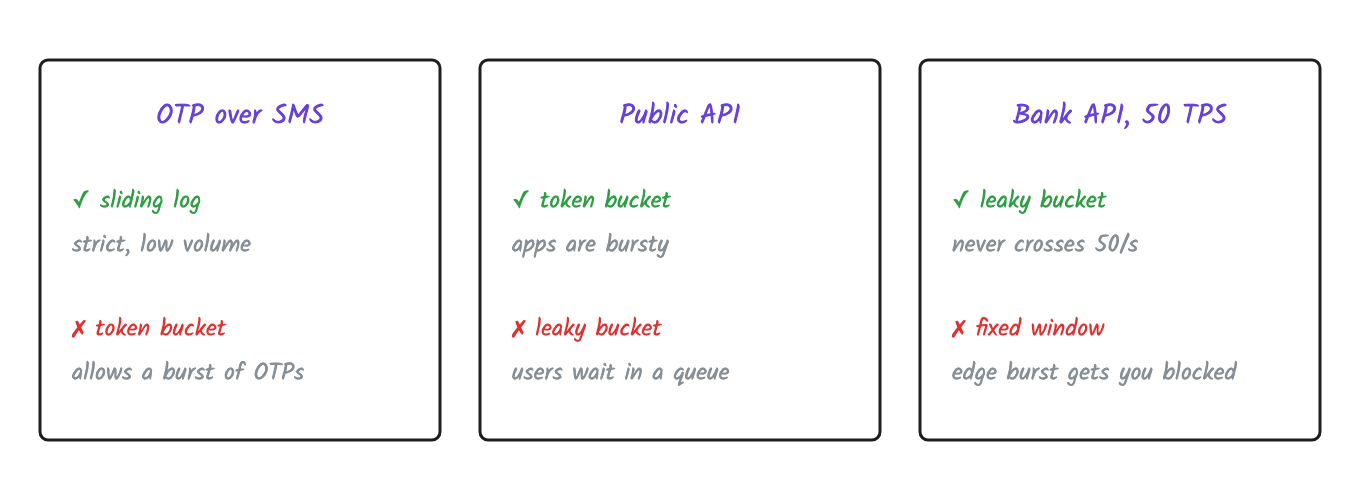
| Use case | Use | Don't use | Why not |
|---|---|---|---|
| OTP over SMS | sliding log | token bucket | allows a burst of OTPs |
| Public API (like Stripe) | token bucket | leaky bucket | users would wait in a queue |
| Bank API with a 50 TPS limit | leaky bucket | fixed window | the edge burst gets you blocked |
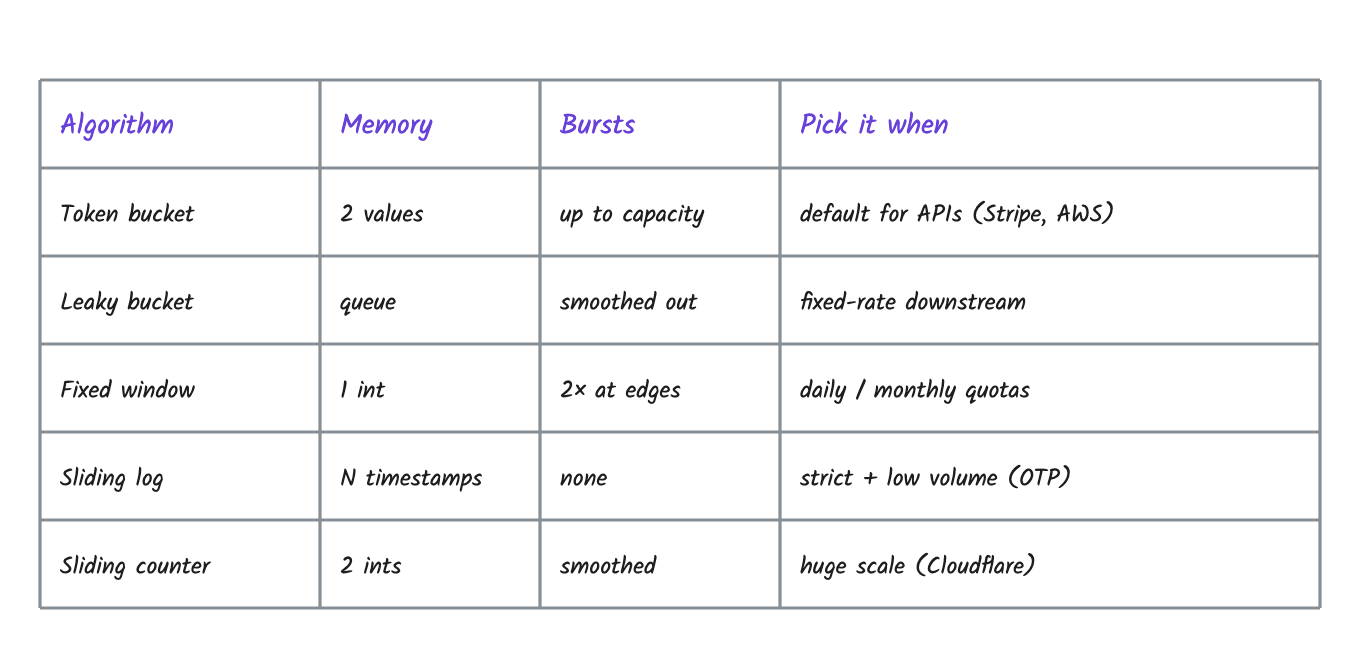
Going distributed
One server is easy. With 10 servers behind a load balancer, each keeps its own counter, so a user gets 10× the limit.
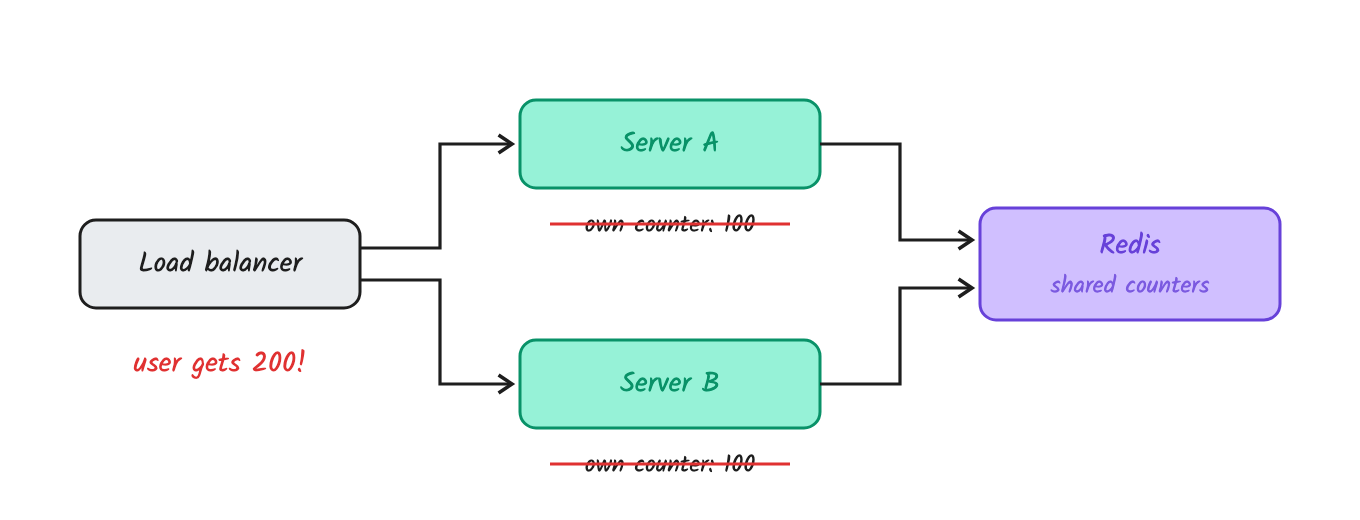
Each server's own counter gives a user 200 instead of 100. One shared counter in Redis fixes it.
Fix: keep counters in one shared place. Redis is the usual choice. It's in memory, about a millisecond away, supports expiry, and has atomic INCR and Lua scripts. Sticky sessions (same user → same server) also work, but they hurt scaling and failover.
Once counters are shared, every algorithm above gets a race: two servers read, check and write at the same time. That's why each one runs as a Lua script in Redis.
Other problems at scale
Latency: every request now makes a network call. Keep Redis close, make one round trip (the Lua script), and pool connections.
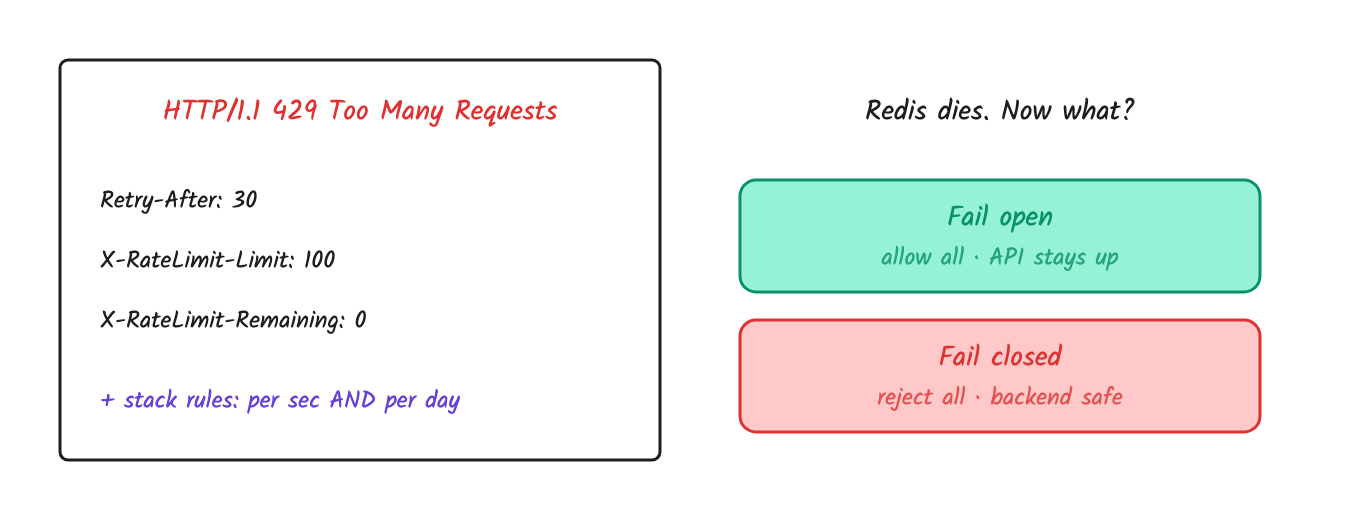
Redis goes down: fail open (allow all, API stays up) or fail closed (reject all, backend stays safe). Public APIs usually fail open. Payments usually fail closed. Say which one and why.
Clocks: servers' clocks don't match. Use one clock, like Redis
TIMEinside the script.Hot keys: one huge customer hammers one Redis shard. Shard by key. For giant customers, keep a local limit and sync to Redis in batches.
Multi-region: one global counter is slow. Split the limit per region (global ÷ regions), or sync later and accept a small overshoot.
Interview follow-ups
Limit by what? By IP, a whole office behind one NAT shares one limit. By user ID, logged-out traffic isn't covered. Real systems combine them: IP for anonymous users, API key or user ID for logged-in ones.
Free vs paid tiers? Free gets 100/min, paid gets 1,000/min. Keep the rules in config, keyed by plan, and cache them in the gateway.
One rule or many? Many. 10 per second and 10,000 per day. Check all of them; any one can reject.
What does the client get?
429 Too Many Requestsplus headers:Retry-After: 30: seconds to wait (the only standard one, RFC 9110)X-RateLimit-Limit: 100: the max allowed in the windowX-RateLimit-Remaining: 0: how many are leftX-RateLimit-Reset: 1729500000: when the window resets (Unix time)GitHub also sends
X-RateLimit-UsedandX-RateLimit-Resource. A newer IETF draft proposes standardRateLimitandRateLimit-Policyheaders.
429 vs 503? 429 means this client sent too many. 503 means the server is overloaded for everyone.
What should the client do? Wait for
Retry-After. If it fails again, back off exponentially (1 s, 2 s, 4 s…) with jitter, a random delay. Without jitter, 1,000 clients retry at the same second and get 429 again. That's a retry storm.Hard vs soft limits? A soft limit lets the request through but raises an alert. Useful when rolling out a new limit to see who it would hit.
How do you monitor it? Track the rejection rate per rule and per customer. A sudden spike means an attack, or a limit set too low.
Quick recap
Building a public API? Use token bucket.
Need a strict limit, like OTP? Use sliding window log.
Calling a slow system like a bank API? Use leaky bucket.
Many servers? Redis + a Lua script, and decide fail open or fail closed.
Coming in Part 2
We'll build all 5 in Node.js with Redis, run them on 2 servers, break them on camera, then fix them with the Lua scripts above.
Subscribe on YouTube or follow this blog so you don't miss it.
References
Comments
Join the discussionNo comments yet. Be the first to comment.