2 GB File Upload System Design: Why Streaming Isn't Enough
I crashed a server with one upload, then measured what actually fixes it
A user uploads a 2 GB file. How do you stop it from crashing your server?
Most people have a quick answer. So I tested it on my 8 GB Mac.
One upload to a Java server with a 512 MB heap failed in 0.6 seconds. In another test, login stopped answering too.
This post shows why, and what actually fixes it.
https://www.youtube.com/watch?v=JtRN3CgTcTE
TL;DR
- A 2 GB upload uses up 3 things on your server: memory, threads and bandwidth.
- Streaming fixes only memory.
- The real fix: the browser uploads directly to S3 with a presigned URL. Your server only gives permission.
- Add multipart upload so a Wi-Fi drop doesn't restart the whole file.
- A presigned URL works like cash. Keep it short-lived and limit the size.
The problem
Most upload endpoints start like this. They work perfectly with a 2 MB photo.
@PostMapping("/upload")
public String upload(@RequestParam MultipartFile file) throws IOException {
    byte[] bytes = file.getBytes();                // the whole file, in the heap
    s3.putObject(request, RequestBody.fromBytes(bytes));
    return "ok";
}
The file travels from the browser to your server, then from your server to S3.
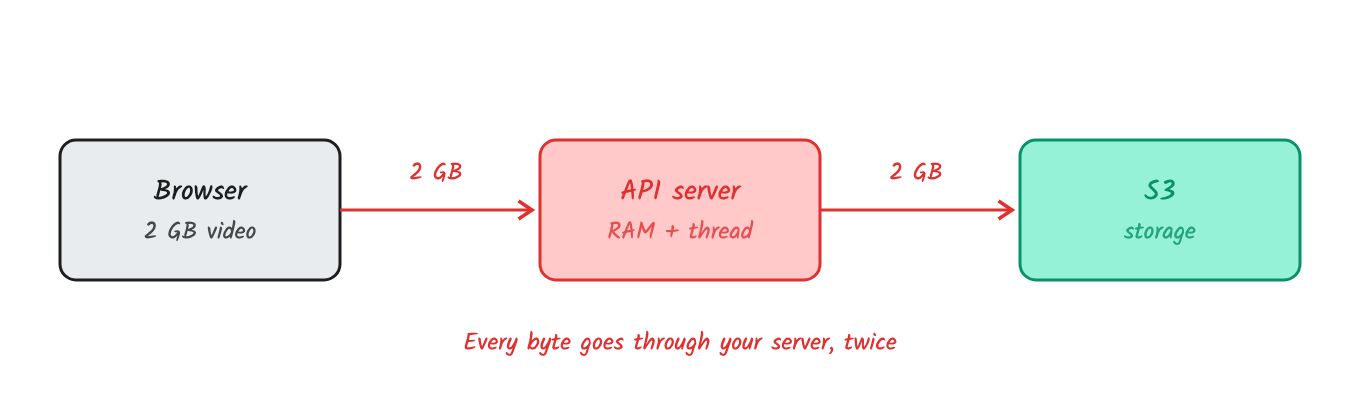
Your server carries the file both ways.
1. Memory runs out
I sent a 2 GB file to a small server that calls readAllBytes(), with a 512 MB heap:
$ java -Xmx512m Lab.java
java.lang.OutOfMemoryError: Java heap space     # after 0.6 s
Then I gave the JVM enough heap and measured peak memory for one 2 GB upload.
One upload needed 1,566 MB in RAM. 10 users at once need about 16 GB. My Mac has 8.
readAllBytes() can't hold 2 GiB in one array, so this run keeps the file as 1 MB chunks in a list. It still holds all 2 GB.
2. Threads get stuck
2 GB is 16,000 megabits. On a 20 Mbps connection, that takes 800 seconds, about 13 minutes.
A Java server handles each request on one thread. So each upload holds one thread for 13 minutes. Tomcat's default pool has 200 threads.
3. Bandwidth is used twice
Every byte comes in from the user and goes out to S3. You pay for that traffic, and it slows down everything else.
What about Node?
Node has no thread per request, so slow uploads don't block it the same way. But it has its own limit. Since Node 18, requestTimeout is 5 minutes by default.
I sent 2 GB at about 20 Mbps to a default Node server:
HTTP 408 after 329 s # 551 MB of 2,048 MB received
The upload can never finish. Also, sync work like hashing a 2 GB buffer freezes the event loop for every user.
First fix: streaming
Idea: don't hold the file. Pass the bytes through in small chunks as they arrive.
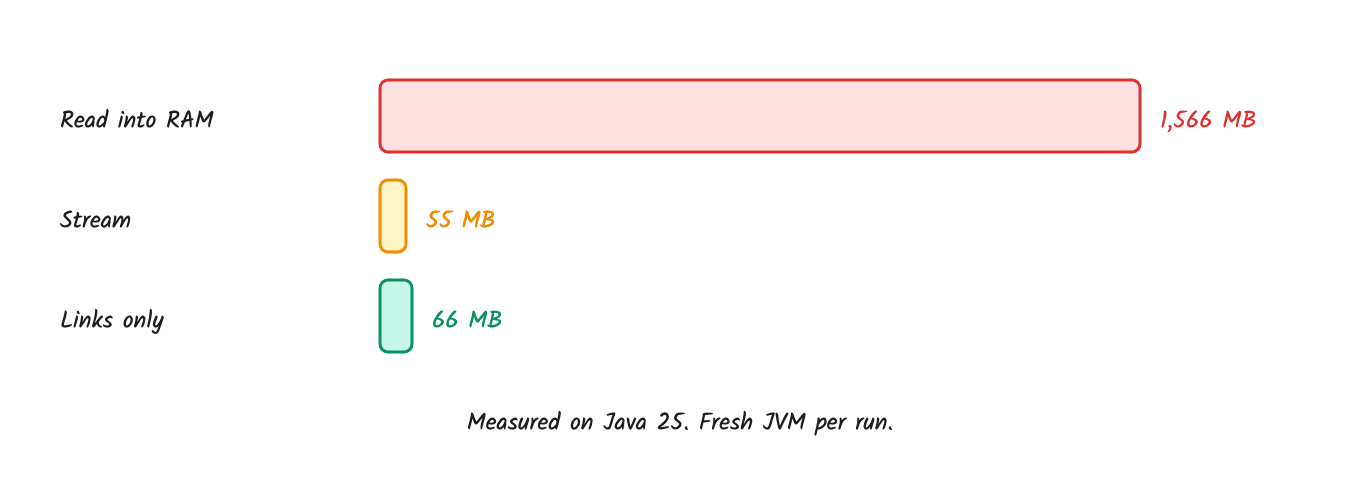
The last run only hands out links and never receives the file. Explained below.
Streaming used 28× less memory than reading into RAM: 55 MB instead of 1,566 MB. Memory is fixed.
Where it fails
To test threads, I used a streaming endpoint with a pool of 10 threads and sent 10 slow uploads.
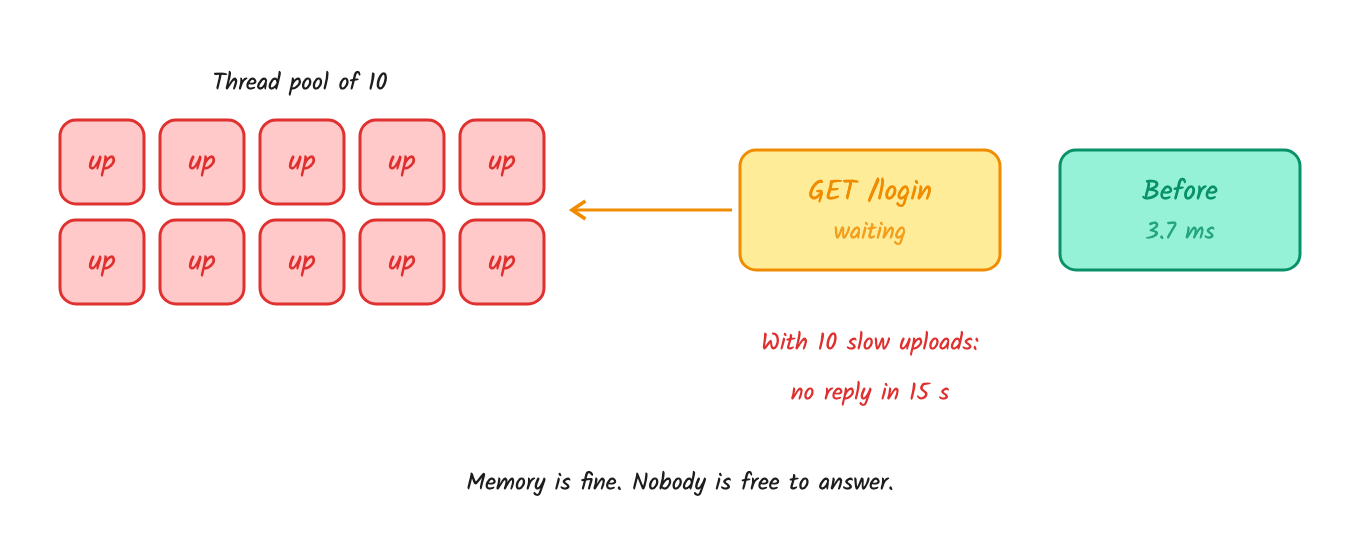
Login took 3.7 ms before the uploads. During them, it got no reply in 15 seconds.
Memory was fine. The server just had nobody free to answer.
Bytes also still cross twice: in from the user, then out to S3.
Try it: pick an approach and drag the sliders.
https://codepen.io/systemdesignwithparam/pen/LEWgXaJ
Answers that sound right
| Answer | Why it fails |
|---|---|
"Raise max-file-size to 2 GB" |
Spring's 1 MB default is a safety guard. Raise it, and the file gets in and uses up your memory. |
| "Store it in S3" | If it goes browser → server → S3, your server still carries all of it. |
| "Use a bigger server" | It raises the limit but doesn't remove it. |
The real problem isn't where the file is stored. It's who carries the bytes.
The fix: presigned URL
Idea: Your server never touches the file. It checks the user and gives permission. The browser uploads straight to S3.
Think of it like: a gate pass in a housing society. Security doesn't carry your furniture. They sign a pass that says "flat 42, valid until 6 PM". The building checks the signature and lets you in.
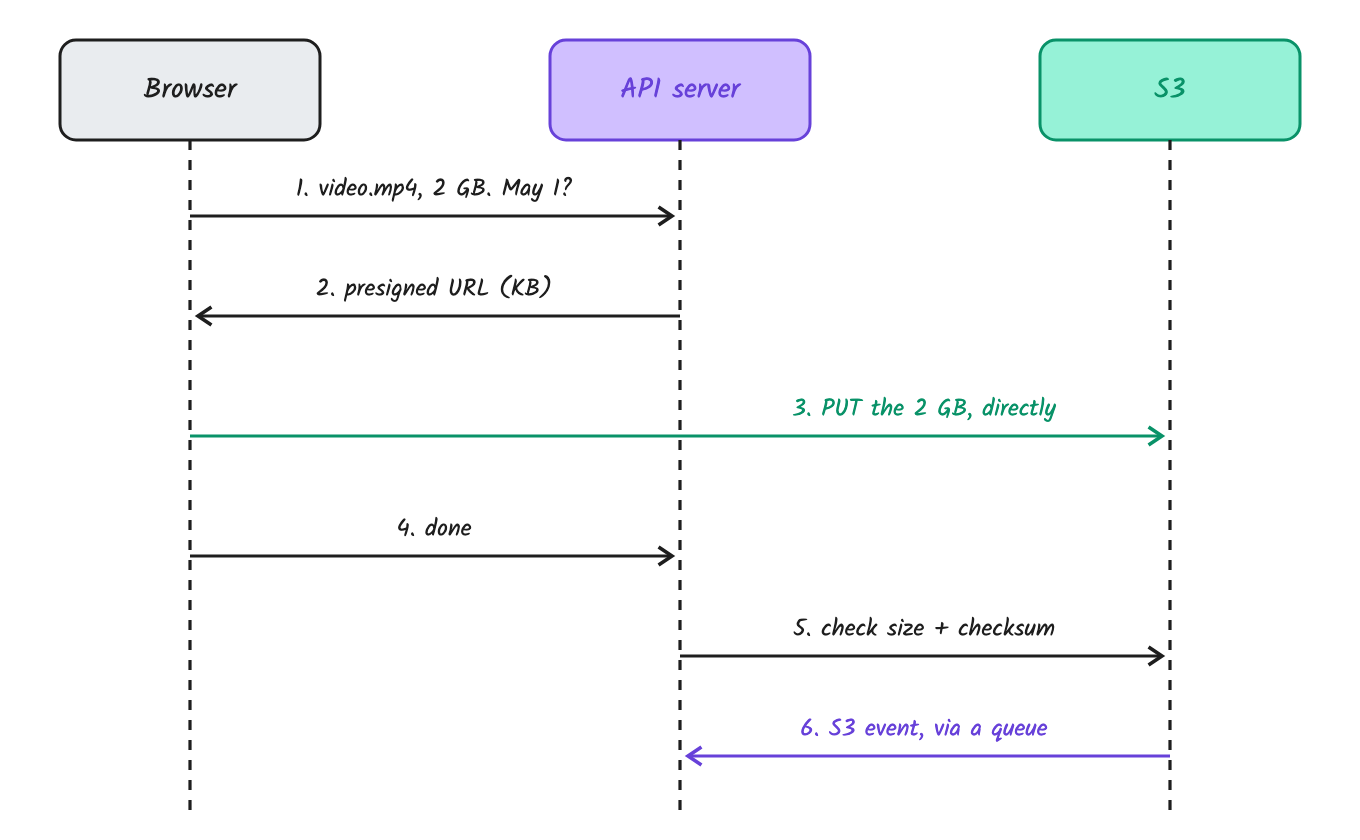
Only step 3 carries the file, and it skips your server.
Your server creates the link like this. The server picks the path, never the client.
const key = `uploads/${user.id}/${crypto.randomUUID()}`;
const url = await getSignedUrl(
  s3,
  new PutObjectCommand({ Bucket: "my-bucket", Key: key }),
  { expiresIn: 600 }   // 10 minutes
);
The link holds the bucket, the path, the allowed action, the expiry and a signature. Change any of them and S3 rejects it.
- ✅ No RAM, no stuck thread, no double bandwidth.
- ✅ In my test, the server stayed at 66 MB while answering 200 URL requests.
- ❌ The client needs more logic.
- ❌ You must handle security yourself, as shown below.
Multipart upload
Idea: Split the file into parts and upload a few at a time. S3 joins them at the end.
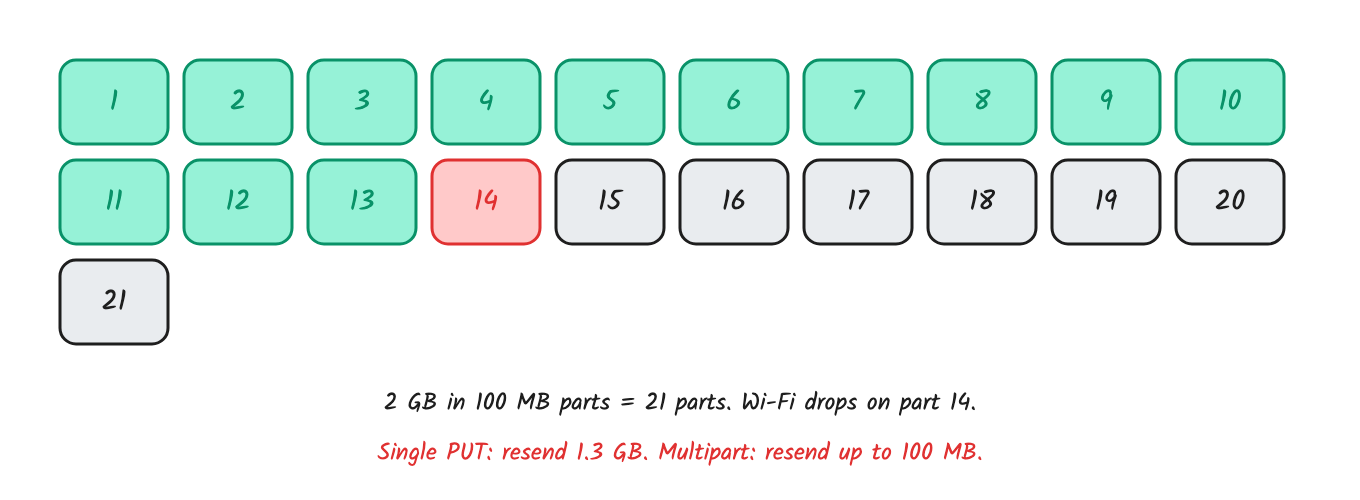
A failed part is sent again. Finished parts stay safe in S3.
Example: 2 GB in 100 MB parts is 21 parts. Your API starts the upload and gets an uploadId. It then signs one URL per part. For each part, S3 returns an ETag, a fingerprint of that part. The client sends all the ETags back, and your API calls CompleteMultipartUpload.
If the user closes the laptop, ListParts shows what S3 already has. The client uploads only the missing parts.
Try it: press Start, then drop the network halfway.
https://codepen.io/systemdesignwithparam/pen/ogZaQVa
S3 numbers to remember:
| Fact | Value |
|---|---|
| Max single upload | 5 GB. Above this, multipart is required |
| Part size | 5 MiB to 5 GiB |
| Max parts | 10,000 |
| Max file size | 48.8 TiB |
| Presigned URL life | Max 7 days, less with temporary credentials |
Good part sizes for 2 GB: 64 to 100 MB, with 3 to 6 parts at a time. More parallel parts don't help, because they share one home connection.
What goes wrong in production
The URL leaks
The problem: a presigned URL works like cash. Anyone who has it can use it until it expires. If you let the client choose the path, it can overwrite another user's file, because S3 replaces files at the same path without warning.
Fix: expire it in 5 to 15 minutes, and let the server pick the path.
Someone uploads 50 GB
The problem: a plain presigned PUT doesn't limit size. Your frontend check doesn't help, because anyone can call the URL directly.
Fix it with a presigned POST, where the size limit is part of the signature:
const { url, fields } = await createPresignedPost(s3, {
  Bucket: "my-bucket",
  Key: key,
  Conditions: [["content-length-range", 0, 2147483648]],  // S3 rejects anything over 2 GB
  Expires: 600,
});
For multipart, sign a fixed number of parts.
The client lies
The problem: the client says "done, 2 GB video". It actually uploaded a 5 KB script.
Fix: call HeadObject from your server. Check the real size and the checksum.
The file is dangerous
The problem: photo.jpg can be anything.
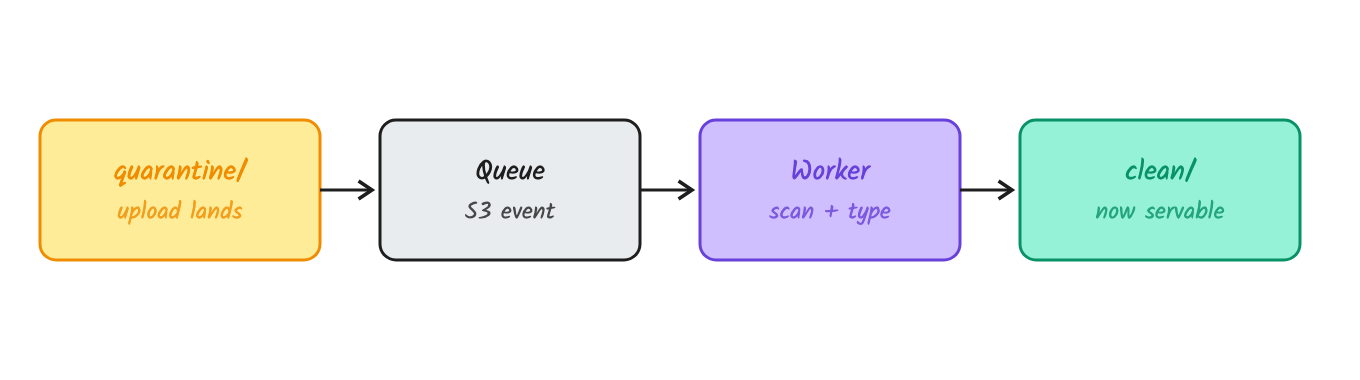
S3 fires an event, and a worker checks the file in the background. The user sees "Processing" right away.
- Check the first bytes of the file, not its name. JPEGs start with
FF D8 FF. - Unzip with a size limit and a time limit, because of zip bombs.
- Rate limit the "give me a URL" endpoint per user.
Abandoned uploads cost money
The problem: unfinished parts don't show in the file list, but S3 still bills you for them.
Fix: add the lifecycle rule AbortIncompleteMultipartUpload, say after 1 day.
Something else rejects it first
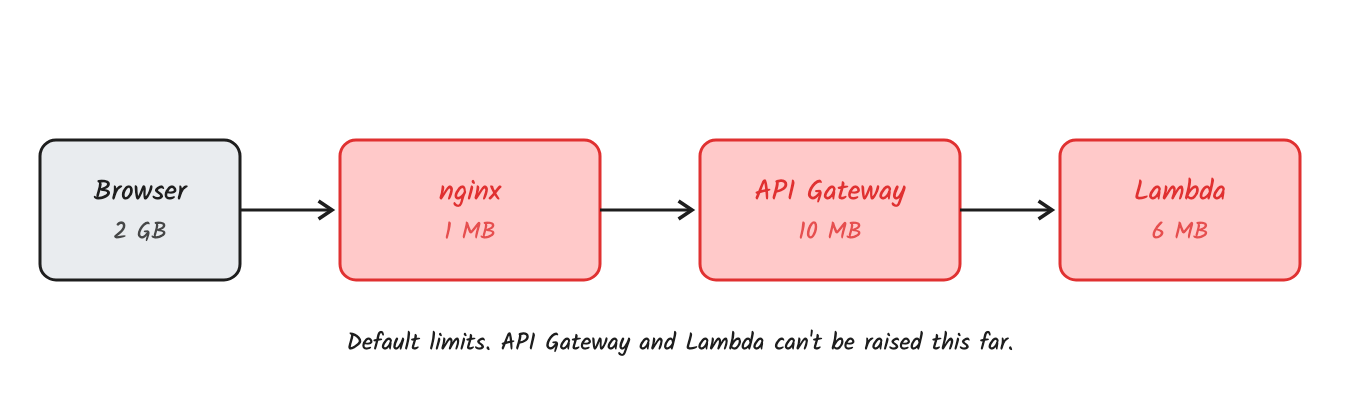
On serverless, direct upload is the only option.
nginx also reads the whole body before forwarding it by default (proxy_request_buffering on). So even a streaming app gets nothing until nginx has the full file.
Interview follow-ups
- When is streaming the right answer? When bytes must pass through you, like encrypting with your own key. Use it as a fallback.
- The URL expires during an upload. What happens? S3 checks expiry when a request starts, so a running part finishes. A retry after expiry fails, so the client asks for a new URL.
- Why not make the URL valid for 7 days? A leaked link works for 7 days. Also, a URL signed with temporary credentials dies when they expire, often within hours.
- The S3 bill grows, but the file count doesn't. Why? Most likely abandoned multipart uploads. Add the lifecycle rule.
- Can Lambda behind API Gateway stream 2 GB? No. API Gateway rejects it at 10 MB, before your code runs.
- Your Node server drops long uploads at about 5 minutes. Why?
requestTimeoutdefaults to 300 seconds. Direct upload removes the problem. - How do you resume after a crash? Save the
uploadId, callListParts, and upload the missing parts. The tus protocol does the same without S3. - What about downloads? It's the same problem in reverse. Use a presigned download URL or a CDN, not your app.
Quick recap
- Small files through your API are fine. Keep the size guard on.
- Big files: presigned URL + multipart, then check the result with
HeadObject. - Processing: a queue and a worker, never inside the request.
Your server should give permission, not carry the file.
This is Day 1 of my system design shorts. Next question: 1 item left, 1,000 buyers, and it sold 3 times. Subscribe on YouTube or follow this blog so you don't miss it.
References
Comments
Join the discussionNo comments yet. Be the first to comment.