How Instagram checks 1 billion usernames and tells you in milliseconds if yours is free
You type rahul_07 on a signup page. Before you finish, it says "This username isn't available."
Now imagine 1 billion users and a check on every keystroke. Sending every check to the database creates load it doesn't need. Keeping every username in memory takes about 72 GB.
A Bloom filter answers most of those checks with about 1.2 GB, and sends only the doubtful ones to the database.
https://youtube.com/shorts/cpJ-RPVXWVk
TL;DR
- Checking every keystroke against a 1-billion-row database is wasted load. A Redis set of every name needs about 72 GB.
- A Bloom filter stores bits, not names: about 1.2 GB for 1 billion names at a 1% false-positive rate, with 7 hash functions.
- Any bit is
0: definitely available, skip the database. All bits1: maybe taken, ask the database. - Size it from two numbers: how many names (
n) and how many wrong "maybes" you accept (p). Overfill it 2× and 1% becomes 16%. - In production: add to the filter before the database, keep the unique index, fail open, rebuild for deletes and growth.
The obvious fixes are expensive
The database is correct, but it should not see every "no".
One check is simple:
SELECT 1 FROM users WHERE username = ?;
With a unique index, this is fast and exact. But typing rahul_07 can fire a check for r, ra, rah and so on. Debouncing (waiting until the user pauses) cuts the requests, but doesn't remove them. Multiply that by every signup, and the database spends its capacity on availability checks.
Cache every username? I loaded 1 million 17-character names into a Redis set. Each took 72 bytes: 17 for the name, the rest data-structure overhead.
1,000,000,000 names × 72 bytes ≈ 72 GB of RAM, before replicas
Cache only the answers? Popular names hit the cache. But people keep trying new variations (rahul_07_x, rahul.0007), and every new name is a miss that goes to the database. The cache misses exactly the traffic we wanted to remove.
What we need answers one narrow question without storing the names:
Could this name exist?
A Bloom filter stores bits, not names
It only has to reject names that definitely don't exist.
A Bloom filter is a large array of bits plus a few hash functions. A hash function turns a name into a number; here, a position in the array.
- Start with every bit set to
0. - To add
bob, run it through 3 hash functions. Say they give 7, 14 and 26. Set those bits to1. - To check a name, run it through the same 3 functions and look at those bits.
If any bit is 0, the name was definitely never added: adding it would have set that bit.
If all bits are 1, the name is maybe present. Other names may have set those same bits. So this check goes to the database.
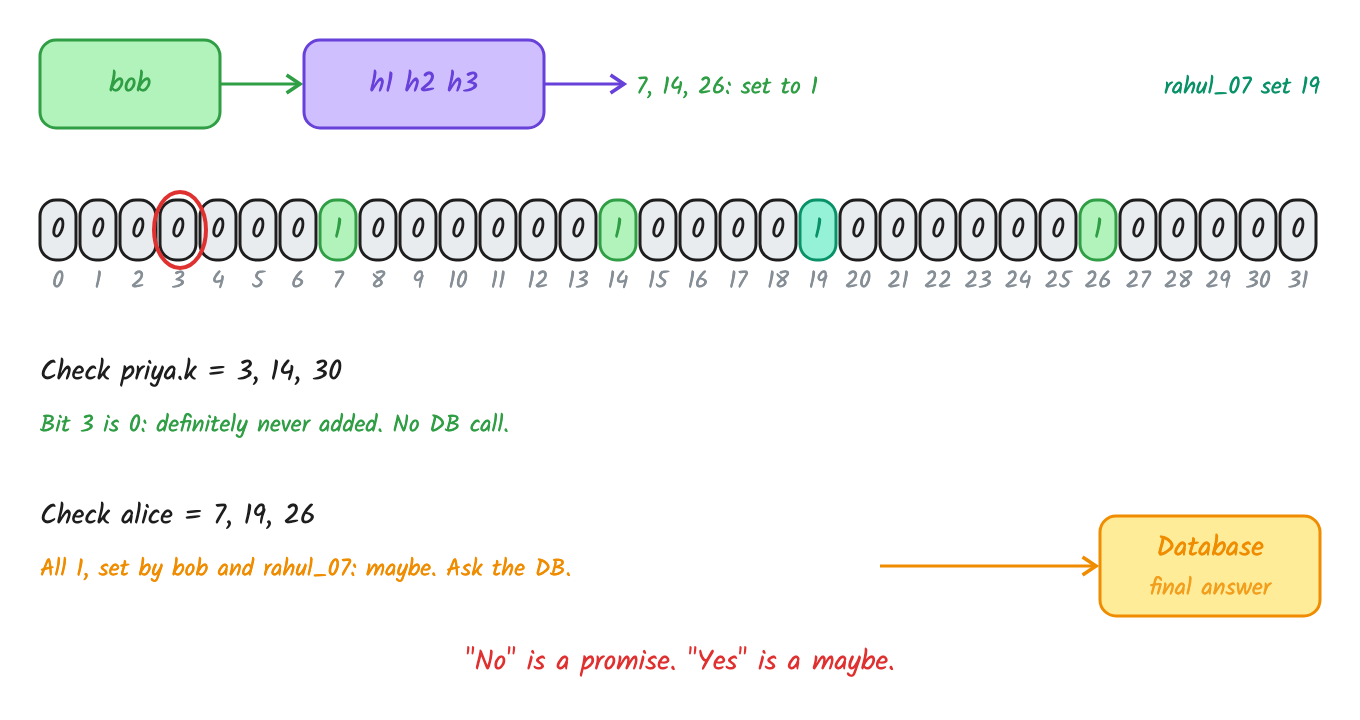
A 0 means never added. All 1s means ask the database.
Try it: add names, check others, then find a false positive.
https://codepen.io/systemdesignwithparam/pen/01a1a274-5f69-71ff-a5e9-cdc21fef15fe
"No" is a promise. "Yes" is a maybe.
A "maybe" for a name that was never added is a false positive. It costs one database lookup, which is safe. The dangerous mistake would be a false negative: saying a taken name is free. A correctly built Bloom filter never does that, because bits only go from 0 to 1, and an added name always maps to the same bits.
The request path
username
   ↓
Bloom filter
   ├─ any bit is 0  → definitely available, skip the database
   └─ all bits are 1 → maybe taken, ask the database
The filter isn't the source of truth. It's a cheap gate in front of it.
How big, and how many hashes
You pick two numbers. The formulas give you the rest.
n: how many names the filter must hold. Plan for growth, not today's count.p: the false-positive rate you accept. 1% means 1 in 100 "available" names still costs a database lookup.
bits needed      m = -n · ln(p) / (ln 2)²
hash functions   k = (m / n) · ln 2
Worked out for 1 billion names at 1%:
ln(0.01) = -4.605,  (ln 2)² = 0.4805

m = 1,000,000,000 × 4.605 / 0.4805 = 9.585 billion bits
  = 9.585 bits per name
  ÷ 8 ≈ 1.2 GB

k = 9.585 × 0.693 = 6.64  →  round to 7 hashes
Check it: the false-positive rate is (1 - e^(-k·n/m))^k.
1 - e^(-7 / 9.585) = 0.518   ← 51.8% of bits end up 1
0.518^7            = 0.0100  ← 1% false positives
Why 7 and not more? Each extra hash checks one more bit, so a stranger is less likely to find them all 1. But each extra hash also sets one more bit per name, so the array fills faster. The best point is when about half the bits are 1. That's what k = (m/n) · ln 2 gives.
Lower p costs about 4.8 bits per name for every 10× improvement:
| False positives | Bits per name | Hashes | 1 billion names |
|---|---|---|---|
| 1% | 9.585 | 7 | 1.2 GB |
| 0.1% | 14.378 | 10 | 1.8 GB |
| 0.01% | 19.170 | 13 | 2.4 GB |
So 1 billion names at 1% is about 60 times smaller than the 72 GB Redis set.
Seven hashes, computed as two. Hashing a name 7 times is slow. Hash it once into two numbers, h1 and h2, and derive the rest: position_i = (h1 + i·h2) mod m. Kirsch and Mitzenmacher showed this keeps the same false-positive rate.
My first JavaScript version got this wrong: h1 + i·h2 went negative because | returns a signed 32-bit number. 416,985 false negatives in 1 million checks. The fix was >>> 0 (unsigned). The lesson: test that every inserted name returns "maybe" before you measure anything else.
Overfill it and "no" turns into "maybe"
The 1% only holds while the filter holds the n it was sized for.
I inserted 1 million names, then checked 1 million names that were never added:
| Setup | False positives | Bits set to 1 |
|---|---|---|
| As planned (9.585 bits per name, 7 hashes) | 1.01% | 51.8% |
| Only 1 hash | 9.92% | 9.9% |
| 20 hashes | 7.05% | 87.6% |
| 2× the planned names | 15.75% | 76.8% |
| 5× the planned names | 83.16% | 97.4% |
False negatives in every run after the fix: 0.
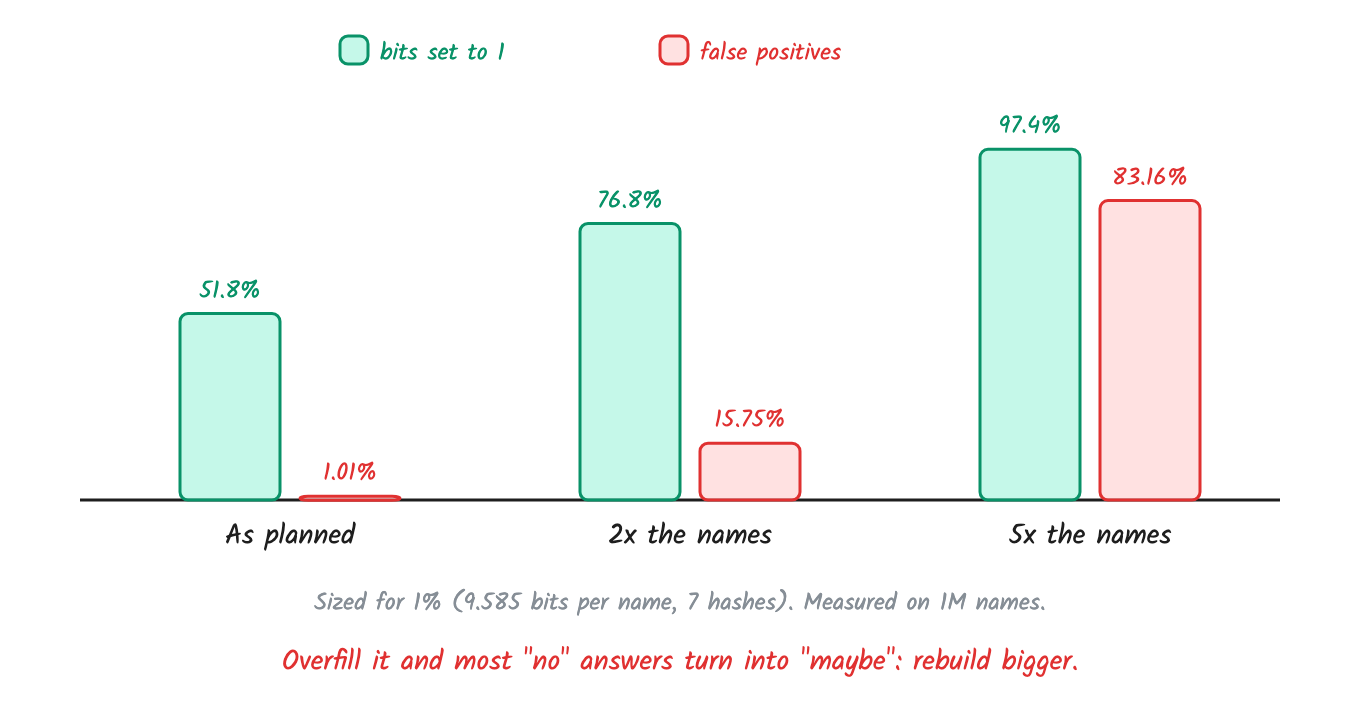
Same filter, more names: the 1% becomes 15.75%, then 83%.
A healthy filter has about half its bits set. Put in twice the planned names, and the 1% becomes nearly 16%. At five times, almost every check becomes a database lookup. Plan for growth, and rebuild before it fills.
Same formula at 2×: 1 - e^(-14 / 9.585) = 0.768, and 0.768^7 = 15.7%. The measurement matches.
Drag the inserted count past the plan and watch the false positives climb:
https://codepen.io/systemdesignwithparam/pen/01a1a274-741b-79ad-a456-c096d0eff3c6
What breaks in production
Every rule here protects one thing: never send a false "no".
- Add to the filter before the database. If the database write succeeds and the process crashes before the filter update, a taken name looks "definitely available". In the other order, a failed write only leaves extra bits: a false positive, which is safe.
- Keep the unique index. Two users can check the same free name at the same moment. The filter can't settle that race; the database's unique index picks the winner.
- Fail open. An empty filter (say, right after a restart) says "definitely available" for everything. Load it from a saved copy before serving checks. If it's still loading or a call times out, ask the database.
- Deletes. You can't clear bits: another name may share them. Rebuild periodically; a deleted name just causes an extra database lookup until then. Counting Bloom filters and cuckoo filters support deletes, at extra cost.
- Growth. Build a bigger filter beside the old one from a database scan, send new signups to both, then swap.
- Normalise first.
Rahul_07,rahul_07andrahul_07must follow the same rule as the database's uniqueness check.
Interview follow-ups
- Size a filter for 1 billion names at 1%. 9.585 bits per name, about 1.2 GB, 7 hashes. Show the formula.
- Can it say a taken name is free? Not if it's built right. Only if an insert was lost: wrong write order, or an empty filter after a restart.
- Why not 20 hashes for safety? More hashes fill the array: 7.05% false positives instead of 1%.
- How do you delete a username? You can't clear bits. Rebuild periodically, or use a counting Bloom filter or a cuckoo filter.
- Users grow 3× next year? Size for the future
n, or build a bigger filter beside the old one and swap. - Where does it live? One shared filter in Redis (
BF.RESERVE users 0.01 1000000000, thenBF.ADD/BF.EXISTS), or a copy in each server's memory. Local copies are faster, but every server must get every new name.
Where else this works
The same trick saves disk reads in RocksDB and Cassandra: a filter per file says "this key isn't here", so the read is skipped. It also stops random product IDs from missing the cache and hitting the database.
Don't use one when most lookups find the item, when the set is small enough to keep exactly, or when you need the values back: it only answers "maybe in the set" or "definitely not".
Verdict
A Bloom filter doesn't replace the database. It lets the database skip the checks that are a definite "no".
72 GB of exact names becomes about 1.2 GB of bits, with a controlled number of "maybes" sent to the database.
This is Day 4 of my system design shorts. Follow the blog for the next one.
References
About the author
- Software developer who writes about system design the practical way. I take interview-style questions like rate limiters, flash sales, and large file uploads, then test them on my own machine and share what actually breaks. New post every few days at System Design with Param.
Comments
Join the discussionNo comments yet. Be the first to comment.